Tuesday, March 19, 2019

Security Related Stuff: Notes


Edit something through inspect element= >
Ø  document.body.contentEditable=true
<. true

OWASP Top 10 Application Security Risks - 2017

Injection flaws, such as SQL, NoSQL, OS, and LDAP injection, occur when untrusted data is sent to an interpreter as part of a command or query. The attacker's hostile data can trick the interpreter into executing unintended commands or accessing data without proper authorization.
Application functions related to authentication and session management are often implemented incorrectly, allowing attackers to compromise passwords, keys, or session tokens, or to exploit other implementation flaws to assume other users' identities temporarily or permanently.
Many web applications and APIs do not properly protect sensitive data, such as financial, healthcare, and PII. Attackers may steal or modify such weakly protected data to conduct credit card fraud, identity theft, or other crimes. Sensitive data may be compromised without extra protection, such as encryption at rest or in transit, and requires special precautions when exchanged with the browser.
Many older or poorly configured XML processors evaluate external entity references within XML documents. External entities can be used to disclose internal files using the file URI handler, internal file shares, internal port scanning, remote code execution, and denial of service attacks.
Restrictions on what authenticated users are allowed to do are often not properly enforced. Attackers can exploit these flaws to access unauthorized functionality and/or data, such as access other users' accounts, view sensitive files, modify other users' data, change access rights, etc.
Security misconfiguration is the most commonly seen issue. This is commonly a result of insecure default configurations, incomplete or ad hoc configurations, open cloud storage, misconfigured HTTP headers, and verbose error messages containing sensitive information. Not only must all operating systems, frameworks, libraries, and applications be securely configured, but they must be patched/upgraded in a timely fashion.
XSS flaws occur whenever an application includes untrusted data in a new web page without proper validation or escaping, or updates an existing web page with user-supplied data using a browser API that can create HTML or JavaScript. XSS allows attackers to execute scripts in the victim's browser which can hijack user sessions, deface web sites, or redirect the user to malicious sites.
Insecure deserialization often leads to remote code execution. Even if deserialization flaws do not result in remote code execution, they can be used to perform attacks, including replay attacks, injection attacks, and privilege escalation attacks.
Components, such as libraries, frameworks, and other software modules, run with the same privileges as the application. If a vulnerable component is exploited, such an attack can facilitate serious data loss or server takeover. Applications and APIs using components with known vulnerabilities may undermine application defenses and enable various attacks and impacts.
Insufficient logging and monitoring, coupled with missing or ineffective integration with incident response, allows attackers to further attack systems, maintain persistence, pivot to more systems, and tamper, extract, or destroy data. Most breach studies show time to detect a breach is over 200 days, typically detected by external parties rather than internal processes or monitoring.

Linux Commands:

Check os version in Linux:

·         $ cat /etc/os-release -  Sample output:
               NAME="Ubuntu"
VERSION="17.10 (Artful Aardvark)"
ID=ubuntu
ID_LIKE=debian
PRETTY_NAME="Ubuntu 17.10"
VERSION_ID="17.10"
HOME_URL="https://www.ubuntu.com/"
SUPPORT_URL="https://help.ubuntu.com/"
BUG_REPORT_URL="https://bugs.launchpad.net/ubuntu/"
PRIVACY_POLICY_URL="https://www.ubuntu.com/legal/terms-and-policies/privacy-policy"
VERSION_CODENAME=artful
UBUNTU_CODENAME=artful

·         $ lsb_release –a :- The lsb_release command gives LSB (Linux Standard Base) and distribution-specific information on the CLI.
·         $ hostnamectl   :- Use hostnamectl command to query and change the system hostname and related settings. Just type the this command to check OS name and Linux kernel version.
·         $ uname –r   :- Just print Linux kernel version.  Can print other info like:
-s--kernel-name
Print the kernel name.
-n--nodename
Print the network node hostname.
-r--kernel-release
Print the kernel release.
-v--kernel-version
Print the kernel version.
-m--machine
Print the machine hardware name.
-p--processor
Print the processor type, or "unknown".
-i--hardware-platform
Print the hardware platform, or "unknown".
-o--operating-system
Print the operating system.
--help
Display a help message, and exit.
--version
Display version information, and exit.


Wappalyzer   - a tool used with the browser (chrome/Mozilla) to show the technologies used in the website.


Defense in Depth: From Udemy - >
            States security should be at every layer.


Host Header:
Tools to detect and show this header:
Browser plugins -> Live HTTP headers, HTTP Fox
Browser Developer Tools
Proxy Tools ->   Fiddler, Charles, Burp, Wireshark

HTTP 1.1 also allows you to have persistent connections which means that you can have more than one request/response on the same HTTP connection.
In HTTP 1.0 you had to open a new connection for each request/response pair. And after each response, the connection would be closed. This leads to some big efficiency problems because of TCP Slow Start.

GET / HTTP/1.1
Host: www.blahblahblahblah.com
This header is useful because it allows you to route a message through proxy servers, and also because your web server can distinguish between different sites on the same server.

·         Automated testing : Nettacker in Kali
                                                                 

                                         *Reference - contents are taken from multiple locations(will try to list later)

Tuesday, March 27, 2018

It seems like DATA WAR is going on... Be careful

In these days when data are used for affecting the government, elections, blackmailing the persons and other similar activities, seems like that data war started.And It is required to analyze the scenario on which points, data are collected by the companies. At every moment of life, we are leaving the trace and we can say companies are storing/steeling trace to use/misuse this information. Some companies have so many information about the person that they can do whatever they want.
I was creating Microsoft Azure account and at that time I went through the Microsoft Privacy Statement. People are neglecting the privacy policy but I think they should always read it before moving further.(https://privacy.microsoft.com/en-us/privacystatement)
I have copied some points from privacy policy about the data type which we are allowing or we are coerced to allow (Compulsion to access various services):

Microsoft Privacy Statement: Personal Data We Collect:
Name and contact data. We collect your first and last name, email address, postal address, phone number, and other similar contact data.
Credentials. We collect passwords, password hints, and similar security information used for authentication and account access.
Demographic data. We collect data about you such as your age, gender, country, and preferred language.
Payment data. We collect data necessary to process your payment if you make purchases, such as your payment instrument number (such as a credit card number), and the security code associated with your payment instrument.
Device and Usage data. We collect data about your device and how you and your device interact with Microsoft and our products. For example, we collect:
  • Product use data. We collect data about the features you use, the items you purchase, and the web pages you visit. This data includes your voice and text search queries or commands to Bing, Cortana, and our chat bots. This also includes the settings you select and the software configurations you use most.
  • Device, connectivity and configuration data. We collect data about your device and the network you use to connect to our products. It includes data about the operating systems and other software installed on your device, including product keys. It also includes IP address, device identifiers (such as the IMEI number for phones), regional and language settings.
  • Error reports and performance data. We collect data about the performance of the products and any problems you experience with them. This data helps us to diagnose problems in the products you use, and to improve our products and provide solutions. Depending on your product and settings, error reports (sometimes called “crash dumps”) can include data such as the type or severity of the problem, details of the software or hardware related to an error, contents of files you were using when an error occurred, and data about other software on your device.
  • Troubleshooting and Help Data. When you engage Microsoft for troubleshooting and help, we collect data about you and your hardware, software, and other details related to the incident. Such data includes contact or authentication data, the content of your chats and other communications with Microsoft, data about the condition of the machine and the application when the fault occurred and during diagnostics, and system and registry data about software installations and hardware configurations.
Interests and favorites. We collect data about your interests and favorites, such as the teams you follow in a sports app, the programming languages you prefer, the stocks you track in a finance app, or the favorite cities you add to a weather app. In addition to those you explicitly provide, your interests and favorites may also be inferred or derived from other data we collect.
Contacts and relationships. We collect data about your contacts and relationships if you use a Microsoft product to manage contacts, for example Outlook.com, or to communicate or interact with other people or organizations, for example Visual Studio Team Services.
Location data. For products with location-enhanced features, we collect data about your location, which can be either precise or imprecise. Precise location data can be Global Navigation Satellite System (GNSS) data (e.g., GPS), as well as data identifying nearby cell towers and Wi-Fi hotspots, we collect when you enable location-based products or features. Imprecise location data includes, for example, a location derived from your IP address or data that indicates where you are located with less precision, such as at a city or postal code level.
Content. We collect content of your files and communications when necessary to provide you with the products you use. For example, if you transmit a file using Skype to another Skype user, we need to collect the content of that file to display it to you and the other user as you direct. If you receive an email using Outlook.com, we need to collect the content of that email to deliver it to your inbox, display it to you, enable you to reply to it, and store it for you until you choose to delete it. Other data we collect to provide communication services to you include the:
  • subject line and body of an email,
  • text or other content of an instant message,
  • audio and video recording of a video message, and
  • audio recording and transcript of a voice message you receive or a text message you dictate.
Video. If you enter Microsoft Store locations or other facilities, or attend a Microsoft event, your image may be captured by our security cameras.
If you use Spend, at your direction, we may also collect payment card information, receipt data, or financial transaction data, to provide the service.
If you use Enterprise Online Services, Microsoft collects Customer Data (including content), Support Data, and Administrator Data, defined below in the Enterprise and Developer Products section.
We also collect information you provide to us and the content of messages you send to us, such as feedback and product reviews you write, or questions and information you provide for customer support. When you contact us, such as for customer support, phone conversations or chat sessions with our representatives may be monitored and recorded.
Product-specific sections below describe data collection practices applicable to use of those products.

Sunday, August 27, 2017

Some common steps for protecting websites: -

Apart from keeping platform up-to-date, installing SSL certificate, installing security plugins, providing password policy stronger, restricting exe file upload etc some common steps should also be cared for protecting the websites.
1. We should restrict uploading of the ZIP file
ZIP and other compressed files can contain virus, Trojans, and other malware, in fact, it's rather common because putting the malware into a compressed archive is an easy way of bypassing your anti-virus/anti-malware software until the archive is decompressed. Even it is not uncommon for unscrupulous people to fake a Zip file. Let’s take virus.exe for the example. Rename the virus.exe file to virus.zip.exe and you have the default setting in Windows Explorer of hiding extensions of known file types, it would appear the file is called virus.zip. An unsuspecting user would think the file is a Zip file, even if it had the wrong icon. Double clicking it would execute the virus infected file.

2. File uploading location should be isolated
It should be isolated from other parts of Server and this location should not be in the root location. In this situation, virus/malware will not affect other part or have a minimal impact. This location should keep limited permissions as only those which are required.

3. Each publically accessible website should be isolated from other
With a system vulnerable to directory traversal, an attacker can make use of this vulnerability to step out of the root directory and access other parts of the file system. This might give the attacker the ability to view restricted files, or even more dangerous, allowing the attacker to execute powerful commands on the web server which can lead to a full compromise of the system.
Depending on how the website access is set up, the attacker will execute commands by impersonating himself as the user which is associated with “the website”. Therefore it all depends on what the website user has been given access to in the system. For more details have a look at this link- https://www.acunetix.com/websitesecurity/directory-traversal/

4. Web Application Firewall can be configured for protecting the web application.

L7LB – Layer 7 load balancer.

WAFs are designed to protect the web application. WAFs are a shielding safeguard intended to defend application accessed via the hypertext transfer protocol (HTTP). They are capable of preventing the attack that network firewall or intrusion prevention system cannot. WAFs sit in front of the web application, monitor application activity, and alert on or block traffic that is malicious or that does not comply with specific rules. The intention is to catch application level attack, such as SQL injection and cross-site scripting, along with attempts to manipulate web application behavior.

Disadvantages (If Web Application Firewall is not there):

After Scanning, attacker can exploit the website
An attacker can steal the user credentials.

Disadvantages (If Web Application Firewall is there):

Increase the possibility of DDOS attack – After implementation of WAF, every packet will be scanned (Not only payload but also deep scanning) so in real time scanning, Uploading and downloading speed can reduce. So denial of service attack is a possibility under it. And the client can face some problem during data submission.
In either instance, there is going to be a performance impact on the ability of the web server to serve concurrent requests. That goes without saying.
Given that, to maintain the ability to serve the same or a similar level of requests, either more web servers or more hardware is required.
To some degree, depending on the architecture of the application, this could potentially be mitigated using tools such as Varnish to cache static content, content which doesn’t need to be inspected by a WAF.
Advantages (If Web Application Firewall is there):
In these days, ransomware is the biggest threat of IT organization. So cyber security is more important than speed and we are configuring WAF (Web Application Firewall and reverse proxy) then security will improve.
As it will have the skill to analyze the payload of the packet and make choices depending on the real content, in addition, it provides content filtering abilities. Being able to analyze the whole network packet instead of only the network interfaces and addresses means they have more extensive logging abilities also, for example, program-specific commands, which provide tips that are useful for working with policy execution and security events.

5. Reverse Proxy server implementation:
A reverse proxy is a type of proxy server that retrieves resources on behalf of a client from one or more servers. These resources are then returned to the client like they originated from the Web server itself.

      After using the reverse proxy, the original IP (IP of the server where the website(s) is (are) hosted) will be invisible in client domain and it may be public or private IP.

References:-

Sunday, July 30, 2017

Basic Understanding of Web Service and Web Server

One day in a presentation I got an example of web service as a website hosted on IIS, having the user interface only for authentication purpose. Although there was some software coding part involved and I got confused that if the web service is like that then what is the difference among web service, website, and web server. During the search on the internet, found so many answers created so many confusions. For example, one confusion is like this web service is used for information exchange from one system to another but I know server to client or client to server, information exchange is also there. Another confusion – Web service may be stateful or stateless but I know that server is also available as stateful or stateless.
    These all confusions was my mistakes because I haven’t tried to understand the meaning of heading word “Service”.  One day, I was studying about some servers and found the definitions as-  a server can offer some services and a client can access or request some services from the server. Now I got the word services here and After getting the word got the exact answer of all confusions and I am able to answer the web service definition as “web service is a piece of software code used to fulfill the communication between Server-Client model or model where information exchange is required from one system to another. Now understand the things in details – Suppose we have a Java Servlet program for authentication and calculation. And the program containing three different parts.
1.   .html part – this part contains the information, which we have to exchange from one point to another. Means the User Interface (Web browser page) part is written in HTML language and the user can enter the authentication credentials on the web page and can view the calculation on the web page after compilation and executions of this HTML code.
2.  .java part –  this page contains the methods used in web services as get, post, delete, etc.
3.  .xml part -  As the extension suggest .xml, this page is written in XML language and used to configure servlet. Means map the Java class, package, HTML page, URL, etc.
Now see the things in a graphical manner.


Wednesday, May 31, 2017

Difference Between Information Security & Cyber Security

·       ICT (Information and Communication Technology) Security
In this context, ICT security refers to relevant incidents as well as measures, controls, and procedures applied by enterprises in order to ensure integrity, confidentiality, and availability of their data and ICT systems.
Data: – Maybe anything. Ex:- 03031989
Information: - The data which is having some meaning. Ex:- 03031989 is a date of birth of someone.
Basic Definition:
Cyber Security: The ability to protect or defend the use of cyberspace from cyber-attack.
Cyber security is about securing things that are vulnerable through ICT. It also considers that where data is stored and technologies used to secure the data. Part of cyber security about the protection of information and communications technologies – i.e. hardware and software, is known as ICT security.

Information Security (1): The protection of information and information systems from unauthorized access, use, disclosure, disruption, modification, or destruction in order to provide confidentiality, integrity, and availability.
Information Security (2): Protecting information and information systems from unauthorized access, use, disclosure, disruption, modification, or destruction in order to provide —\

1)   integrity, which means guarding against improper information modification or destruction;
Attack -   Modification

2)   confidentiality, which means preserving authorized restrictions on access and disclosure, including means for protecting personal privacy and proprietary information;
Attack – Interception

3)   availability, which means ensuring timely and reliable access to and use of information.
Attack - Interruption

 Information security is all about protecting the information, which generally focuses on the confidentiality, integrity, availability (CIA) of the information.

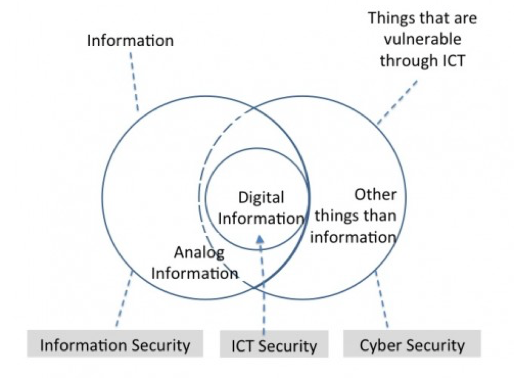
Following Venn diagram can be helpful to understand the differences.


Reference- Center for Cyber and Information Security (https://ccis.no/cyber-security-versus-information-security/)

In the diagram below, we can see that right side Venn diagram represent the Cybersecurity (things which are vulnerable through ICT, it includes information, both physical and digital, and non-information such as cars, traffic lights, electronic appliances, etc.), while left side represent the information security (which consist of information both digital and analog).
Note that IT security is the protection of information technologies. Practically, there is no difference in ICT security and IT security. As you can see in the following picture that both sets are having some overlap. Below diagram illustrates the relationship between ICT security, cyber security, and information.

Reference- Center for Cyber and Information Security (https://ccis.no/cyber-security-versus-information-security/)
(http://www.cisoplatform.com/profiles/blogs/understanding-difference-between-cyber-security-information)


Tuesday, May 30, 2017

MEECES– Meaning of Hacker

Max Kilger likes to get into the heads of computer criminals. Throughout his many years of research, he's developed a motivational profile he calls "MEECES" - for money, ego, entertainment, cause, entrance to social groups and status. Max Kilger likes to get into the heads of computer criminals. He chats with these people at conferences and online and studies their behavior when they hack inside Honeynet's decoy computers. Throughout his many years of research, he's developed a motivational profile he calls "MEECES" - for money, ego, entertainment, cause, entrance to social groups and status. MEECES is a modification of the FBI and military security's counterespionage profile called MICE - which stands for money, ideology, compromise and ego. Kilger outlines behavioral motivators in a 60-page chapter on hacker profiling in the second edition of the Honeynet-developed book "Know Your Enemies," due from Addison Wesley in May. Here's the upshot of those motivators:
Money - Stolen credit cards become currency for certain crime rings and social groups of carders who trade them for access to other compromised credit card databases.
Ego - Spanning the entire spectrum of the community from black hat to white hat hackers, ego is the drive to solve a problem, look at the code, see how something works, and then get it to do something it wasn't created to do.
Entertainment - The bored teenager syndrome is not as strong as in the days of big disk drives and mainframes, but it remains a motivator. "You'll still see a hacker break into a system, trash it up and sit back and watch the system administrator scurry around trying to save it," Kilger says.
Cause - Think hacktivism, mostly Web site defacements and distributed denial-of-service attacks for politics and ideologies.
Entrance into social groups - Hackers achieves this by sharing their successful break-ins with the groups they want to be included in.
Status - This is the strongest motivator among all hackers, crackers, and carders because their main emphasis is on skills. The higher profile the target, the higher their status.
Reference - http://www.networkworld.com/article/2330885/lan-wan/meeces-to-pieces.html

Hackers are able to do a lot more today, without the steep learning curve. The FBI define the motivation of individuals who commit espionage against the country, with the acronym, MICE, money, ideology, compromise or coercion, ego or extortion. Researcher, Max Kilger, proposed that the motivations for the hacker community can be thought of as MEECES, money, ego, entertainment, cause, entrance, and status. Attackers could be outsiders, competition, hacktivists, organized crime, terrorists, governments, even hired guns!

Reference - https://courses.edx.org/courses/course-v1:RITx+CYBER501x+2T2017